
SimpleTime Pro
More from the time you track.
SimpleTime stays free – everything it can do without Pro stays that way. Pro adds your Apple Watch, places that start tasks on their own, reviews of your week, month and year, goals and more.
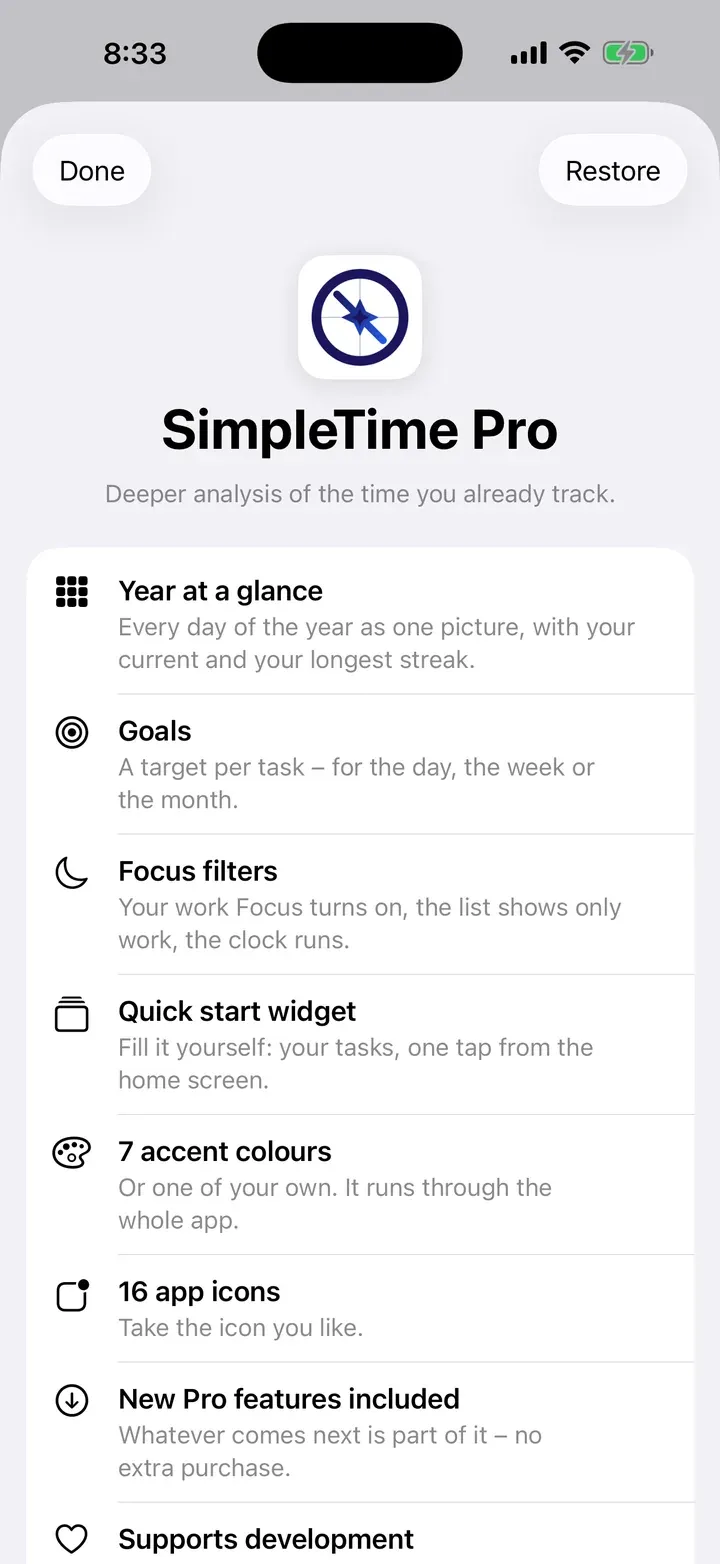
What Pro adds
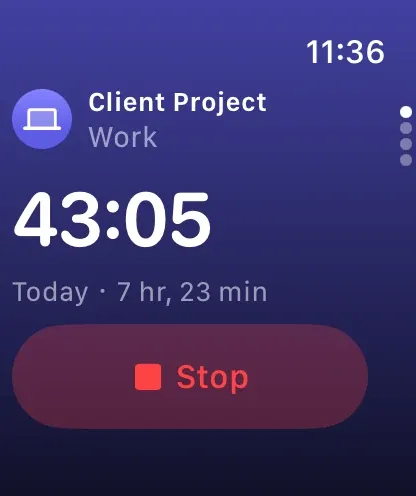
Apple Watch
Start and stop from your wrist, start earlier, keep an eye on your day, week and goals – with the running time on your watch face.
Reviews
Your week, month and year as cards – to page through and share.
Places
Tasks start on their own when you arrive – after a waiting time, if you like, so nothing starts when you just drive past.
Year at a glance
Every day of the year as one picture, with your current and your longest streak.
Goals
A target per task – for the day, the week or the month. Subtasks count towards it.
Focus filter
Your work focus turns on, the list shows only work – and tracking can start and end with it.
Quick-start widget
You decide which tasks sit on it. One tap on the Home Screen starts them.
Colours and app icons
Seven accent colours or one of your own, running through the whole app – plus sixteen app icons.


More in the PDF report
Trend, spread across the day, comparison with the previous period, and goals – in the order you choose.
Everything still to come
Whatever is added later is included – without another purchase.
Three ways to Pro
Prices depend on your country and are shown in the app in your currency before you buy.
Monthly
Billed every month. You can cancel at any time.
Yearly
Billed once a year – the app shows how much you save compared with paying monthly.
Lifetime
Pay once and keep Pro for good. It never expires.
- New subscribers can try Monthly or Yearly free for a week.
- Family Sharing: one purchase for up to six people.
- Whatever is added later is included – without another purchase.
Monthly and yearly renew automatically until you cancel. You can cancel any time in the App Store settings. Lifetime is a single payment and never expires.
What stays free
Everything you need for tracking: tasks and subtasks, the day view and timeline, charts and statistics, the PDF report and CSV export, widgets, the Live Activity, Control Center and Siri, iCloud sync and backups, and the app lock – in 41 languages. No account, no ads, no tracking.
How to get Pro
- 1In SimpleTime, open Settings › SimpleTime Pro.
- 2Choose Monthly, Yearly or Lifetime – you pay through your Apple Account.
- 3Pro is unlocked right away, on all your devices with the same Apple Account.
Questions about Pro
Can I try Pro first?
Yes. New subscribers can try Monthly or Yearly free for a week; the app shows whether the trial applies to you. If you don’t cancel at least 24 hours before it ends, the subscription renews at the price shown.
Can my family use Pro too?
Yes. SimpleTime Pro works with Family Sharing – one purchase for up to six people.
How do I get Pro on my other devices?
Pro belongs to your Apple Account. On your other devices with the same account, it’s usually unlocked by itself. If not, tap Restore on the Pro page under Settings › SimpleTime Pro.
How do I cancel my subscription?
In your App Store settings – on iPhone under Settings › your name › Subscriptions – or in the app on the Pro page under Manage subscription. Pro stays active until the end of the period you’ve already paid for.
I have a subscription – can I switch to Lifetime?
Yes, right on the Pro page. Apple doesn’t end the subscription by itself, though: cancel it afterwards so that it doesn’t renew. The app reminds you.
What happens when Pro ends?
Nothing gets lost. Your entries, goals and places stay saved. The Pro features are locked again – places, for example, no longer start tasks – and everything is back as soon as Pro is active again.
Does Pro need an internet connection?
No. SimpleTime checks your purchase with the App Store whenever it can. Without a connection, Pro keeps working – for up to two weeks without contact.

Start for free.
Download SimpleTime – and unlock Pro in the app whenever you want.